

Shorten links, customize URLs and track clicks.
pqno.app brings a link shortener, Link in Bio, collections and analytics together in one account. Paste a URL to get started, or create a page that gathers everything you publish.
To save the link you need to log in. We take you to the login and bring you back.
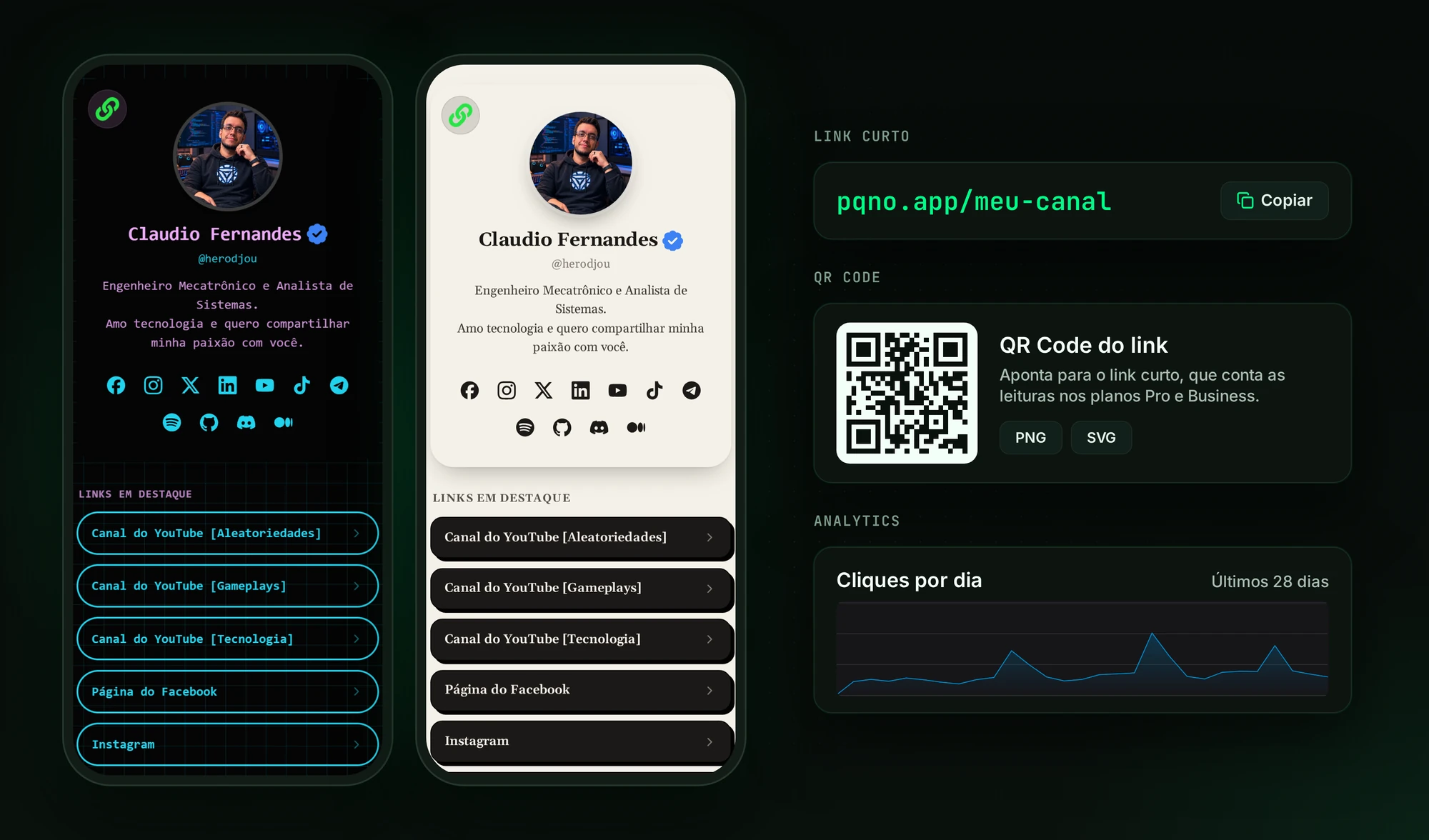
Everything you need to work with links.
Create short links to share, organize your content on one page and track visits from the same dashboard. Use only what you need today and combine features when it makes sense.
Link shortener
Turn long URLs into short addresses that are easy to share. Use the automatic code or customize the end of the link on eligible plans. It works for campaigns, content, materials, social media and anywhere a simple address helps.
Link in Bio
Gather links, collections, text, images and videos on a page of your own, with ready-made templates and visual customization. Rearrange the blocks whenever you want and publish everything at a single address.
Analytics
Track clicks over time and find out which links are getting the most visits.
pqno.app features
Custom links
Create addresses like pqno.app/your-project that are easy to recognize and share. On the Pro and Business plans.
Collections
Group links by campaign, product, topic or any organization that makes sense to you, with order, highlight and a display rule in each section.
Link in Bio
Combine links, collections, images, videos and text on the same public page.
Templates
Choose from 20 templates and adjust colors, backgrounds, fonts and buttons.
Analytics
See clicks over time and the ranking of your most visited links.
API
Create links and query pqno.app data from your own systems, on the Pro and Business plans.
Import and export
Move your data to another environment in JSON, or work with many links at once in CSV.
Link in Bio without branding
On the Business plan, your Link in Bio can be published without the pqno.app mark.
Create your first link in seconds.
Paste the URL
Enter the address you want to share, or start with your Link in Bio.
Create the link
Use the generated code or choose a custom address, depending on your plan. For the Link in Bio, also set the content, the look and the organization.
Share it
Use the new link anywhere and track visits from the dashboard.
Build your Link in Bio with blocks.
Add what you want to show, rearrange the page in the editor and choose how each group of links appears, on phone and on desktop. There are 20 ready-made templates, plus options for colors, backgrounds, typography, buttons and a desktop layout.
- Individual links
- Collections
- Text
- Images
- Videos
- Pinned links
- Recent content
- List or grid
- 20 ready-made templates
- Colors, backgrounds, fonts and buttons
- Wide layout on desktop
Where to use short links and the Link in Bio
Short links and public profiles open right in the browser, with no app, on any channel. The Link in Bio adapts from phone to desktop with the same page.
- Social media bios
- Campaigns
- Presentations
- Digital materials
- Email signatures
- Product pages
- Messages
- Editorial content
Integrate pqno.app with your systems.
On plans with API access, you can create links, list URLs and get statistics without going through the dashboard. Authentication uses a Bearer token.
If the process already runs in your system, the link shortener does not need to become one more manual step.
- Create links
- List links
- Get statistics
curl -X POST "https://pqno.app/admin/api/encurtar-link/criarlink" \
  -H "Authorization: Bearer YOUR_TOKEN" \
  -H "Content-Type: application/json" \
  -d '{"url": "https://example.com"}'
{
"status": "ok",
"dados": {
"id": 4821,
"codigo": "k7p2x",
"url_curta": "https://pqno.app/k7p2x"
}
}Illustrative example. The token is generated in the dashboard, on the Pro and Business plans.
pqno.app plans
Free
R$0
- Up to 5 links
- Profile page with collections
- Statistics for the last 7 days
- Custom QR Codes
Pro
R$19.90/month
- Unlimited links
- Custom code
- Full stats
- Custom QR Codes
- QR Codes with scan tracking
- Daily down-link alert on sites that return error 404
- API with 1,000 requests per day
- Verified badge subject to review
Business
R$99.90/month
- Everything in Pro
- Custom QR Codes
- API with 10,000 requests per day
- Up to 10 team seats
- Profile without the site branding
Free covers basic use. Pro adds unlimited links, customization and the API. Business raises the limits and adds features for companies.
Compare plansFrequently asked questions
What is a link shortener?
How does pqno.app work?
How do I create a short link?
Can I use pqno.app for free?
Can I create a custom link?
Does pqno.app have a Link in Bio?
Can I track clicks?
Does pqno.app have an API?
Can I export and import links?
Create your first link for free.
All it takes is the address you want to shorten.